Official Canada Blog
News and notes from Google Canada
Putting Mario on the Map
Friday, March 9, 2018
We know a true Mario fan when we see one. They hum the
Ground Theme
on repeat, daydream about collecting gold coins and 1-UPs, and want nothing more than to traverse the Mushroom Kingdom with Luigi, Toad, and Yoshi to rescue Princess Peach from the evil Bowser.
To celebrate our favorite mustachioed plumber-turned-racer on his special day - MAR10 Day - we’ve collaborated with the team at Nintendo to let Mario accompany you on all of your driving adventures on Google Maps this week.
To get started, you’ll need to first update your app from Google Play or the App Store. Next, simply click on the yellow “?” icon found on the bottom right of your Google Maps app on Android or iOS. You’ll then see a prompt to enable Mario Time!
Once enabled, you’ll see that the navigation arrow has morphed into - who else? - Mario, who will be a constant companion wherever you’re driving this week - to work, to school, or the spaghetti house. Just remember to practice safe driving on the road - we don’t encourage throwing bananas or red shells at other drivers in real life!
Ready to take a drive with Mario? Take a screenshot of your route and share it with @GoogleMaps on Twitter and Instagram with the hashtag #MarioMaps. Let's-a go!
Cryptography, Cloud and Equality: a Q&A with Google Security expert Maya Kaczorowski
Thursday, March 8, 2018
Note from the editor:
What do Julie Payette, Indira Samarasekera and Jenni Sidey have in common? They are just some of Canada’s fierce female masterminds who’ve graduated in the field of either science, technology, engineering or mathematics (STEM) and who continue to impact our society. We already have plenty of talent in Canada. However, we are not turning out enough computer science graduates to keep up with demand, especially not enough women. It's never been more critical that we give our young girls the tools they need to become the technology builders of tomorrow. One of the ways we can better equip them, is by exposing young women to how their future studies could directly apply in the real world and make them aware of the exciting career opportunities in STEM. In the hopes of doing just that, we’ve sat down for an interview with one of own trailblazers, Montrealer Maya Kaczorowski, a Product Manager at Google in Security & Privacy.
Can you tell us about your current role at Google and how you got here?
Currently, my focus is on securing workloads running in containerized environments – which is a mouthful! To clarify, containers are a relatively new way of running workloads especially in the cloud. Our team uses tools such as Docker and Kubernetes which ultimately make our customer’s applications more portable.
Prior to this, I focused on encryption at rest and encryption key management, and was the Product Manager for Google Cloud Key Management Service (Cloud KMS). Before joining Google, I worked as a management consultant at McKinsey & Company, serving financial, healthcare and insurance customers on a variety of topics, where I discovered my passion for security strategy.
What’s your educational background?
I completed a BA&Sc in Mathematics and Economics at McGill University in Montreal and then pursued a Master in Science in Applicable Mathematics, focusing on cryptography and game theory at the London School of Economics.
Can you tell us what motivated you to pursue a career in science and technology?
I always liked solving puzzles and when I took a number theory class at McGill, I realized cryptography was a great mesh of puzzles, math, and practical use cases in security. I pursued my interest in cryptography, and ended up doing a Master's degree in the field. It wasn’t a straight path from there to a technical role in the industry, however, by seizing the right opportunities when they arose, I ultimately ended up in role that was meant for me, at Google working with the encryption team. I’m especially excited about working in infrastructure security, which is a huge focus given the uptake of the cloud industry. There’s a lot of opportunity for development, and for innovation in this space.
What challenges did you face as a woman during your studies and then throughout the course of your career?
Being taken seriously has always been difficult. I can remember going to some of my first conferences in security, and people asking me if I was a reporter, or what I ‘really’ worked on, even if I had Google written on my badge. No one will give you the benefit of the doubt, you have to initially prove yourself. I’m lucky that I had the opportunities to do so, and the courage to not let people dismiss me easily.
Why is now a great time for women to pursue careers in tech?
There are two complementary forces at work - it’s a friendlier and more attractive industry for women; and companies are also realizing they need women to be more successful. In general, there are already more women in tech, and more women in leadership roles - mentoring and acting as role models for the next generation of women.
Why are women uniquely qualified to excel in some of these leadership roles?
Without over-generalizing, women bring different viewpoints to the workplace. Research has shown that more diverse teams lead to better business outcomes, and teams with more women tend to have more individuals actively participating in decision-making processes. In any product, but especially in security, having individuals from a variety of backgrounds leads to building better, more useful products.
What advice would you have for other women considering following a career in science and tech?
Simply, just go for it. Given how accessible information and tutorials are nowadays, you can teach yourself anything. I often see people falter in their belief that they need to have gone to a particular school, or have a particular degree, or particular life experience, in order to have a particular job. Compared to men, women are less likely to apply to jobs where they don’t meet all the requirements, but there’s really no harm in trying. Ask others in the industry how they got where they are, teach yourself that, ask questions where you don’t understand, and go for it.
Additionally, when I studied mathematics, about half of my class was women - which I know is unusual. We were a headstrong bunch, each taking on leadership roles in student government, research, and other campus activities; and standing up for each other if needed. I would encourage women to support each other and to take on leadership roles either within your program of study, in the community or specific ecosystem they are aiming to persevere in.
What do you think would encourage more women to pursue studies in science and technology?
I don’t think there’s an easy solution to gender equality in tech, which is why we’re all trying to improve it! I think having more exposure to how your studies are directly applicable in the real world, in the form of internships and co-ops, helps any student get a better idea of whether or not this work interests them, and what’s needed to be successful.
Introducing Family Link to Canada
Tuesday, February 13, 2018
“Hey Mom, can I get a smartphone?” is a question that most Canadian parents will likely hear at some point in their lives. And it’s no surprise why -- Canada’s Generation Z is highly connected. According to our research, 76% of Canadian kids between the ages of 2-12 now own or share a tablet and 37% own or share a smartphone.
Managing our children’s use of these devices, however, can be tricky. We want them to explore and be inspired as they embark on their digital adventure, but every family feels differently about what their kids should and shouldn't be able to do on their device.
That’s why we’re happy to bring
Family Link
to Canadian parents starting this week. Family Link helps parents create Google Accounts for their children under 13, and manage their use of Android devices.
Here’s how it works: First, your child will need a compatible Android device (
see which devices work with Family Link)
. Create a Google Account on your child's device, and enter their information. You'll link their new Google Account to yours, and choose the apps and settings that you want for your child. You can then use Family Link to do things like:
Manage the apps your child can use
Approve or block the apps your child wants to download from the Google Play Store.
Keep an eye on screen time
See how much time your child spends on their favourite apps with weekly or monthly activity reports, and set daily screen time limits for their device.
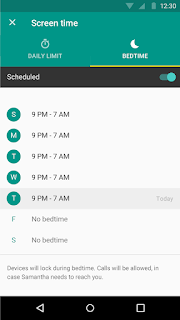
Set device bedtime
Remotely lock your child’s device when it’s time to play, study, or sleep.
Family Link can help parents stay in the loop and set certain ground rules around how children use their devices. As we continue to develop Family Link, we’d love to hear from Canadian parents on how we can make the Family Link experience even better. To share your feedback, select Help and feedback from the menu directly in the Family Link app.
If you have questions about setting up an account for your kid or using Family Link, check out our
Help Centre
. To help your kid make smart choices when using their device, check out our
tips for families
.
Posted by Charles Zaffaroni, Product Manager, Kids and Families
It’s Safer Internet Day: Key tools to protect yourself online #SaferInternetDay
Tuesday, February 6, 2018
Today we’re celebrating
Safer Internet Day
, an occasion where technology companies, security firms, nonprofit organizations and people around the world come together to focus on online safety.
At Google, we are committed to keeping you safe online, both on our products and across the internet. Whether it’s Google Play Protect automatically checking apps to keep you protected, YouTube’s
Trusted Flagger Program
experts flagging harmful content on our platform, or our
Safe Browsing
technology protecting over half of the world’s online population from dangerous websites, we’re always working to provide products, resources, or tools to keep you safer.
It’s understandable that people are concerned about protecting their data online, but you should know that your Google data is secured by the best protections in the world, and we’ll never stop improving them to help ensure your information stays safe.
In honour of Safer Internet Day, we wanted to remind you of our recently launched tools that can offer extra protection so you can truly enjoy your online experience, without worrying.
Tailored for you - the new Security Checkup
We recently rolled out a new version of our
Security Checkup
, which now provides personalized guidance to help you improve the security of your account. Instead of the same checklist for everyone, the Security Checkup is now a tailored guide to securing your data - your own personal security advisor.
The Security Checkup provides a clear security status and personalized recommendations to strengthen your account security
The Security Checkup provides a clear security status and personalized recommendations to strengthen your account security
When you visit the checkup, you’ll automatically see your security status: a green check mark icon means you’re good to go, and a yellow or red exclamation point icon means there’s at least one issue for you to take care of.
The new Security Checkup will keep evolving as new threats arise. You can count on it to provide you with relevant, up-to-date security advice that you can use to help keep your account safe. Take the new Security Checkup at
g.co/securitycheckup
.
Google’s strongest security, for those who need it most
When operating at the scale of Google, we usually strive to build products that serve the needs of billions of people. But when it comes to online safety, we know needs differ among our users.
That’s why back in October we introduced our
Advanced Protection Program
. This program provides Google’s strongest security, designed for those who are at an elevated risk of attack and are willing to trade off a bit of convenience for more protection of their personal Google Accounts.
For example, these might be campaign staffers preparing for an upcoming election, journalists who need to protect the confidentiality of their sources, or people in abusive relationships seeking safety. Sometimes even the most careful and security-minded users are successfully attacked through phishing scams, especially if those phishing scams were individually targeted at the user in question.
Once you enroll in Advanced Protection, we’ll continually update the security of your account to meet emerging threats—meaning Advanced Protection will always use the strongest defenses that Google has to offer.
At the start, the program focuses on three core defenses.
The strongest defense against phishing:
Advanced Protection requires the use of Security Keys to sign into your account. Security Keys are small USB or wireless devices and have long been considered the most secure version of 2-Step Verification, and the best protection against phishing. They use public-key cryptography and digital signatures to prove to Google that it’s really you. An attacker who doesn’t have your Security Key is automatically blocked, even if they have your password.
Protecting your most sensitive data from accidental sharing:
Sometimes people inadvertently grant malicious applications access to their Google data. Advanced Protection prevents this by automatically limiting full access to your Gmail and Drive to specific apps. For now, these will only be Google apps, but we expect to expand these in the future.
Blocking fraudulent account access:
Another common way hackers try to access your account is by impersonating you and pretending they have been locked out. For Advanced Protection users, extra steps will be put in place to prevent this during the account recovery process—including additional reviews and requests for more details about why you've lost access to your account.
Anyone with a personal Google Account can enroll in Advanced Protection.Today, you’ll need Chrome to sign up for Advanced Protection because it supports the U2F standard for Security Keys. We expect other browsers to incorporate this soon.
For now, Advanced Protection is only available for consumer Google Accounts. To provide comparable protections on G Suite Accounts, G Suite admins can look into Security Key Enforcement and OAuth apps whitelisting.
Sign up for Advanced Protection at g.co/advancedprotection.
Google Canada’s #YearInSearch: 2017
Wednesday, December 13, 2017
In 2017, Canadians searched “How” questions more than ever. In March, we asked
How to make slime
...and in April we asked “How to take slime out of the carpet?” We came together to witness a
celestial natural wonder
and asked
How do you make solar eclipse glasses?
...And the following day (some of us) asked:
Why do my eyes hurt?
Today, we’re launching
Google Canada’s 17th annual Year in Search
, taking a look back at the newsmakers, defining moments and, yes, those burning questions that captured our attention as
global citizens
,
neighbours
and
fans
.
From
What does Despacito mean?
(adverb: To move slowly)
to figuring out whether the
Instant Pot
, invented in Ottawa, is everything it’s
crocked
up to be, our relationship with the Search bar is more intimate and more immediate than ever before - in fact, searches for “
near me
” reached an all time high in 2017. The Year in Search is Google’s annual analysis of trillions of searches performed globally throughout the year. The results include everything from top trending people, sports, music, politics, news and more.
Canadians came together in 2017 searching to learn, to grow and to understand. We asked tough questions like
How do wildfires start?
;
What Kind of cancer did Gord Downie have?
; and
Why are flags at half mast
? And we searched for protests and movements like
Why are women marching?
and #metoo. Canadians remembered past icons and searched for futures ones like
Meghan Markle
and
Denis Shapavalov
.
It was a year of quirks (
how long is a giraffe pregnant
), firsts (
Canada’s first visible minority elected as a federal party leader
) and
Wonder
. So, before we turn the collective page on 2017, take a moment to look back at the year that was through the lens of Google’s
Year in Search
.
See you in 2018… and, until then, Search on!
Posted by Alexandra Hunnings, Google Canada Trends Expert
Hit that Despacito, Canada - It’s YouTube Rewind!
Wednesday, December 6, 2017
It’s that time again, to jump into the wayback machine for #YouTube Rewind - our annual look back at the year that was through the lens of YouTube.
This year Canadians headed to YouTube to gasp as a
sea lion got a bit too frisky,
to giggle as a
toddler stole popcorn from Prince Harry
, and to fall in love with
falling in love
. We gathered to watch as
April the Giraffe gave birth to her baby
, Tajiri, live in front of an audience of 1.2 million, setting a new record for the most popular livestream on YouTube. And we held our breath as a
moose and a wolf squared off in a Northern Ontario lake
.
From
Eminem’s blistering political cypher
at the BET Awards to some perfectly executed
ping pong trick shots
, these were the moments that had us watching, clicking and sharing.
Canada’s Top Trending Videos of 2017
Sea lion drags girl into Steveston waters
Eminem Rips Donald Trump in BET Hip Hop Awards Freestyle Cypher
Animal Adventure Park Giraffe Cam
Ping Pong Trick Shots 3 | Dude Perfect
Northern Ontario Moose vs Wolf
Woman interrupted during BBC interview
Sneaky toddler steals Prince Harry’s popcorn
In a Heartbeat - Animated Short Film
$1 donut vs. $100 donut
France 24 en direct - 24 hour livestream news channel
2017 also saw some major new records broken in music, most notably by Luis Fonsi and Daddy Yankee's massive global hit. Despacito sits at the top of 2017's top music video list -- not just as the most-viewed music video for year, but as the most viewed YouTube video of all time with 4.4 billion views.
Justin Bieber set new records this year - his remix of Despacito, along with his appearance on DJ Khaled’s I’m The One mean that the Biebs can now lay claim to 4 videos that have broken the one billion view threshold. Taylor Swift’s Look What You Made Me Do set the all-time record for most views in the first 24 hours, earning 43.2 million views in its first day. Among the top ten debuts in YouTube history, seven were released in 2017.
Canada’s Top Music Videos of 2017
Luis Fonsi - Despacito ft. Daddy Yankee
Ed Sheeran - Shape of You [Official Video]
DJ Khaled ft. Justin Bieber, Quavo, Chance the Rapper, Lil Wayne - I’m the One
Bruno Mars - That’s What I Like
Kendrick Lamar - HUMBLE.
Taylor Swift - Look What You Made Me Do
The Weeknd - Reminder
Zedd & Alessia Cara - Stay (Lyric Video)
Cardi B - Bodak Yellow
Shawn Mendes - There’s Nothing Holdin’ Me Back
When it came to movies, we saw studios get even more creative with their pre-marketing campaigns, with both Thor: Ragnorok and Deadpool 2 releasing a series of short films on YouTube that played up their comedic main characters. But as we wait for the release of the next instalment of Star Wars on December 15, the teaser trailer for this highly anticipated film claims the top spot in this year’s ranking.
Canada’s Top Movie Trailers of 2017
Star Wars: The Last Jedi Official Teaser
IT - Official Teaser Trailer
Thor: Ragnarok Teaser Trailer
Black Panther Teaser Trailer
DEADPOOL 2 Teaser Trailer (2018)
JUSTICE LEAGUE - Official Trailer 1
THE BOSS BABY “Diapers” Trailer Tease (Animation, 2017)
THE EMOJI MOVIE Trailer 1 - 3 (2017)
BLADE RUNNER 2049 - Official Trailer
SPIDER-MAN: HOMECOMING - Official Trailer #2
YouTube has also changed the game when it comes to ads - in the past five years, ads have gon
Read more »
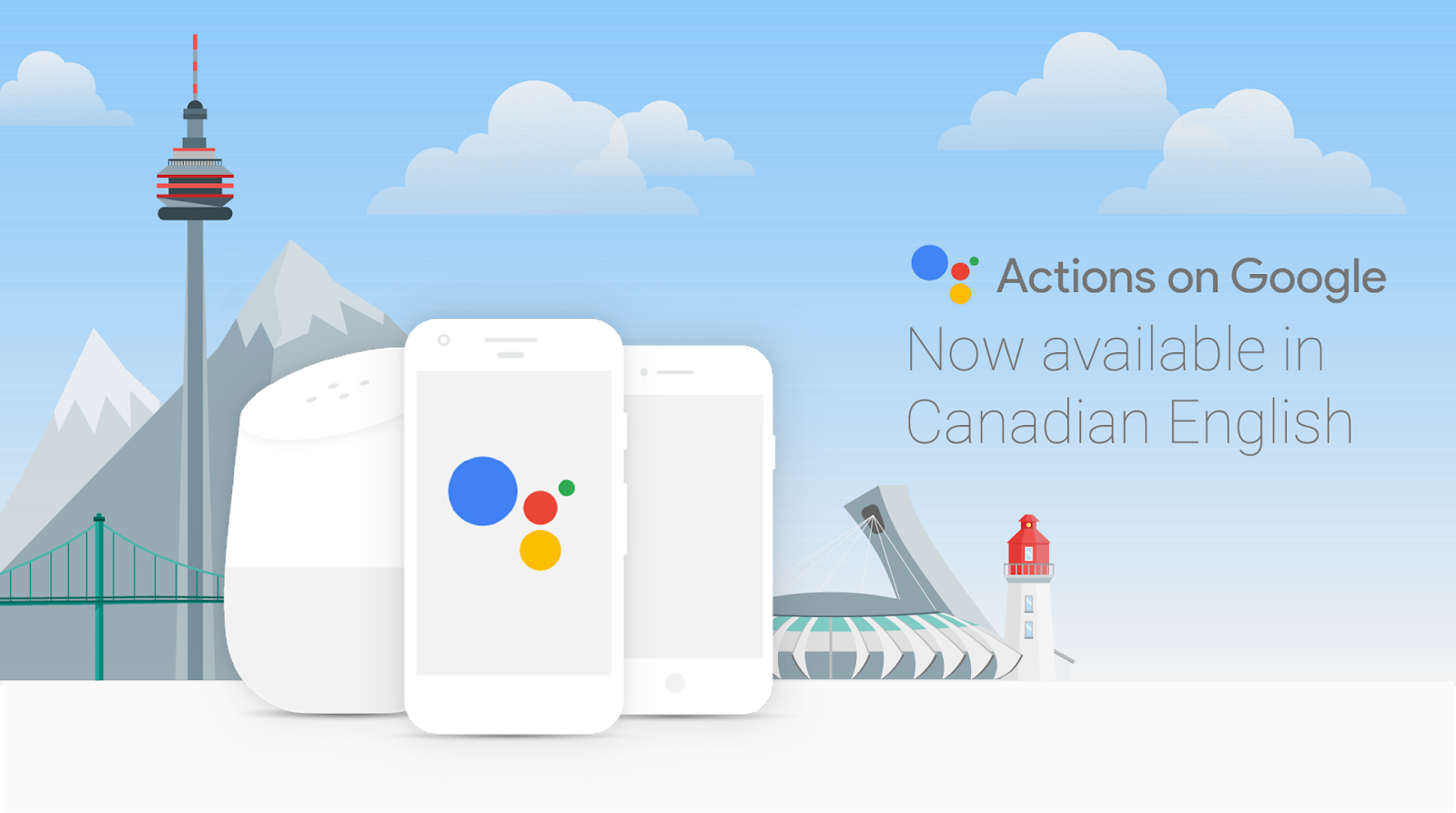
Introducing apps for the Canadian Google Assistant
Wednesday, November 15, 2017
Whether you’re planning the perfect holiday date night, mapping your travels or helping the kids with their homework, your Google Assistant is always ready to help. You can ask about your day or your commute, explore your favourite topics, control your entertainment and smart lights, and get answers to hundreds of small and big questions during your day.
But to be truly helpful, your Google Assistant should be able to connect you across the apps and services in your life. Independent developers and companies can already build apps for the Google Assistant through
Actions on Google
in English and French, and starting today as a user, you’ll be able to access more of your favourite services and content directly through your Google Assistant.
Now, Canadians have easy and fast access to all types of apps. Want to finally crown the hockey trivia champ amongst your family or friends? Say “
Ok Google, Drop the Puck
” to play a game that tests your hockey knowledge. If you’re looking to craft a perfect cocktail, ask “
Ok Google, talk to Tender
”. Find a holiday gift for everyone on your list with “
Ok Google, talk to Best Buy Canada
”.
Once an app is available with the Google Assistant, you can just tell your Assistant to connect you with the app with a simple voice command – whether it’s on
Google Home Mini,
Google Home
,
Pixel
, Android phones or
iPhones
. No downloading necessary.
Stay tuned as more local Canadian apps rollout in English and French, and dive in starting today by trying one of the many apps already available. To explore the latter, launch the app directory in the
Google Assistant on your phone
(you can find it at the Explore tab by tapping on the blue button on the right within the Assistant experience on your phone) or check out the
Google Home app
.
For anyone who wants to build for the Google Assistant, resources such as
developer
tools
,
documentation
and a
simulato
r
are available on the
Actions on Google
developer website, making it easy to create, test and deploy apps. Developers can read more
here
.
We hope that this growing platform will give more Canadians the help they need, at home or on-the-go – whether you’re kickstarting your morning or unwinding in the evening. With our partners, we look forward to exploring and delivering these new possibilities for the Canadian Google Assistant.
Posted by Brad Abrams, Group Product Manager, Google Assistant
Labels
#AI
2
#AIforsocialgood
1
#Artist
1
#Artistontherise
1
#canada
1
#cbcindigenous
1
#Chrome #GoogleCanada #Google
1
#chromebooks #googleforeducation #googlecanada
1
#Chromecast #ChromecastGames #Christmas #Xmas2015 #AngryBirds #Google #AngryBirdsFriends
1
#COVID-19 response
2
#creators
1
#DFO
1
#digitalskills
2
#EarthDay
1
#EnvironmentalInsights #EIE #ClimateAction
1
#GameOn
1
#GlobalJournalismFund
1
#GNI
1
#Google
3
#Google #GoogleCanada #GooglePlay #PlayPass
1
#Google #Accessibility
1
#Google #ArtsAndCulture #GroupOfSeven #Canada #Arts
1
#Google #GoogleAudio
1
#Google #GoogleCanada #GrowwithGoogle
1
#Google #GoogleCanada #Innovation
6
#Google #GoogleCanada #Arctic #Whistler
1
#Google #GoogleCanada #DecadeinSearch #TorontoRaptors #Toronto #BiancaAndreescu #TragicallyHip #Drake #JustinBieber
1
#Google #GoogleCanada #EIE #EnvironmentalInsightsExplorer #Sustainability
1
#Google #GoogleCanada #EIE #EnvironmentalInsightsExplorer #Sustainability #ClimateAction
1
#Google #GoogleCanada #GNI
2
#Google #GoogleCanada #Google.org #ArcticEiderSociety #Inuit #CanadianArctic
1
#Google #GoogleCanada #GoogleCalendar #Android #iphone
1
#Google #GoogleCanada #GoogleKW #Waterloo #Engineering #Innovation
2
#Google #GoogleCanada #IWD #IWD2020 #InternationalWomensDay #AI
1
#Google #GoogleCanada #IWD #IWD2020 #InternationalWomensDay #Communications
1
#Google #GoogleCanada #Nest #NestHubMax #Duo#GoogleMeet
1
#Google #GoogleCanada #Pixel #Pixel4
1
#Google #GoogleCanada #Pixel #Pixel4a #5G
1
#Google #GoogleCanada #Pixel #Pixel4a #Sustainability
1
#Google #GoogleCanada #PixelBuds #FeatureDrop
1
#Google #GoogleCanada #Stadia
1
#Google #GooglePlay #Family #FamilyLibrary
1
#Google #GooglePlayMusic #Beatles #Music
1
#Google #GooglePlayMusic #GooglePodcasts #GoogleCanada
1
#Google #GoogleTV #Chromecast
2
#Google #Nest #NestAware #Canada #GoogleCanada
1
#Google #Olympics #GoogleOlympics
1
#Google #Olympics #GoogleOlympics #GoogleCanada #Rio #Rio2016
2
#Google #Pixel #Pixel5G
1
#Google #PixelBuds #GoogleCanada
1
#GoogleAI
1
#GoogleCanada
15
#googlecanada # google.org #challenge #GIC #ImpactChallenge #canada
1
#GoogleCanada #Family #Android #YouTube #GooglePlay
1
#GoogleCanada #Google #AI #IWD2020
1
#GoogleCanada #Google #IWD2020 #IWD
1
#GoogleCanada #Google #SmallBusiness #SMBs #ShopHERE
1
#GoogleCanada #GoogleAI #Innovation
1
#GoogleCanada #GooglePlay
1
#googlecanada #pixel3
1
#GoogleCanada #Pixel4 #NestMini #NestWifi #NestHubMax #PixelbookGo #Stadia #PixelBuds #Sustainability
1
#googlecanada #pixelslate
1
#GoogleCanada #Startups #Innovation
4
#GoogleCloud
3
#GoogleExpeditions #SaveThePolarBears #GoogleCanada #PolarBearsInternational
1
#GoogleforEducation
1
#Googleforsmallbusiness
1
#GoogleMaps
3
#googlemaps #indigenous
1
#GoogleMeet
1
#GoogleNest #GoogleAssistant
2
#GoogleNest #Sustainability #GoogleCanada
1
#GoogleNewsInitiative
2
#GoogleNewsInitiative #News
1
#GoogleSearch #Events #MarchBreak
1
#GoogleSearch #GoogleMaps
1
#GoogleStreetView #StreetView
1
#googletranslate
1
#GoogleWaterloo
1
#GrowwithGoogle
3
#GSuite
1
#Indigenous #nationalaboriginalday #indigenousmapping #google #googlemaps #googleearths #canada #canada150
1
#innovation
1
#IWD #InternationalWomensDay
1
#JERF #GNI
1
#JobsOnGoogle #Employment
1
#KW
1
#language
1
#madebygoogle #MadeToHelp #GoogleCanada #Google #Helpfulness #RonaldMcDonaldHouseCharities #RMHC
1
#Mila
1
#MobileMonth
3
#Music
1
#News
4
#News #Search
1
#NewsWise
2
#ParksCanada
1
#ParksDay
1
#photos #food #GoogleCanada
1
#Pixel
2
#PledgeToVote
2
#Pride2020
1
#rainforestconnection
1
#saferinernetday
2
#savethewhales
1
#Search #YearInSearch
1
#SmallBusiness
3
#Stadia
2
#StadiaFreeTrial
1
#StadiaMontréal
1
#StadiaTeam
1
#streetartproject
1
#StreetView
2
#ThinkBrand
3
#toronto
1
#Travel #Search #googlemaps
1
#VectorInstitute
1
#whaletracking
1
#WorldEnvironmentDay #Environment
1
#YearInSearch
2
#YIS2021 #GoogleCanada #SearchOn #ThanksforAsking
1
#YouTube
3
#youtube #creators #canada #montreal #quebec #YouTubeSpace
1
#youtube #creators #nextup #canada
2
#YouTube #GoogleCanada #GoogleAI #Innovation
1
#youtube #Toronto #Google #advertising #ad #pulse #youtubepulse
1
#YouTube #YouTubeCanada
1
#YouTube #YouTubeFanFest #YTFF #Toronto #Google #iisuperwomanii #unicornisland #molsonamp
1
#youtubemusic
2
2018
1
360
1
Ads
15
Adwords
5
Agency
3
Agency Edge
2
AI
1
Allo
1
Analytics
1
Android
5
Android Apps
4
Arctic
6
art
1
Assistant
2
Availability
1
Award Winners
1
Back to School
7
bestbuy
1
bestbuycanada
1
Big Tent
1
Billboard Charts
1
Brand
4
Buffer Festival
2
Buffer Industry Day
2
Canada
3
Canada 150th
1
Canada NGO
1
Canadian
1
Canadian Innovation
2
Canadian Music
2
Canadiana
1
CBC
2
CBC News
1
CBCMusic
1
CBCNews
1
ChanningTatum
1
Chrome
9
Chrome Experiments
4
Chrome OS
3
Chrome Webstore
1
Chromebooks
5
Chromebox
1
Chromecast
6
chromecastultra
1
ChromeOS
1
Civic Engagement
3
Cloud
1
Cloud Computing
2
Codemakers
4
Comedy Week
1
Community Grants
4
Computational Thinking
1
contest
1
COVID-19
1
CS First
1
CSS3
1
D4G Canada
1
Daydream
1
Digital Economy
6
DIY Videos
2
Doodle
1
Doodle 4 Google Canada
2
Duo
1
Easter
1
Election
1
Elections
5
engineering
1
Enhanced Campaigns
1
EnMasse
1
Enterprise
5
eTowns
1
Francais
1
French
1
French Canadian
1
Full Value of Mobile
1
Geek Street
1
GIC
1
Gmail
4
Gmail App
1
Go North
1
GoneGoogle
4
GoNorth
1
google
4
Google Allo
1
Google App Engine
1
Google Apps
5
Google Apps for Business
2
Google AR & VR
1
Google Art Project
4
Google Assistant
1
Google Books
1
Google Calendar
2
Google Camp
1
Google Canada
4
Google Cloud
2
Google Cloud Platform
1
Google Cloud Storage
1
Google Coder
1
Google Cultural Institute
2
Google Currents
1
Google Developer
1
Google Docs
1
Google Doodle
1
Google Education Team
3
Google Engage
1
Google for Education
1
Google for Entrepreneurs
1
Google for non profits
1
Google for Seniors
1
Google Giving
1
Google Hangouts
3
Google Holiday
3
Google Impact Challenge
1
Google Kitchener-Waterloo
3
Google KW
2
Google Maps
30
Google Montreal
4
Google Music
1
Google My Business
1
Google Partner Serach
1
Google Partners
1
Google Play
10
Google Play Gift Cards
1
Google Play Music
4
Google Retail
2
Google Rise Award
1
Google Sites
1
Google Translate
1
Google TV
1
Google Waterloo
2
Google Wifi
1
Google+
2
GoogleCanada
3
googleshop
1
GoogleWifi
1
Grammys
1
Grow with Google
1
Guest Blog
1
Hackathon
1
Hangouts
3
happy birthday Canada
1
Hardware
1
Holiday
2
Home
1
How-to
2
How-to videos
2
Innovation
6
Innovation Week
5
Insights
1
LilySingh
1
LiveCase
1
Livestream
1
Livestreaming
1
machine learning
1
Made by Google
1
madebygoogle
3
Maps
15
Mobile
12
Montreal
1
Multi-Screen
2
Music
2
MyLiveCase
1
O2S
1
Online Impacting Offline
1
Open Data
2
Passover
1
Peter Mansbridge
1
pixel
5
Play TV
1
playmusiccanada
1
Policy
1
Product
1
Product Launch
1
Products
1
ProudToPlay
1
Public Alerts
1
Quebec
1
Research
1
Retail
3
Search
10
Search Trends
23
security
2
Shopping
1
small business
3
SMB
6
Songza
1
STEM
2
STEM Education
5
Street View
1
StreetView
1
Super Bowl
1
technology
1
Templates
1
The National
1
TheHip
1
TheTragicallyHip
1
Think Insights
3
TouTube FanFest
1
Travel
2
Trends
12
Updates
1
Video
1
Video Trends
6
VideoCalling
1
Videos
1
Vimy150
1
Virtual Reality
1
VR
1
Web Audio API
1
WebGL
1
WebRTC
1
WomenatGoogle
7
World Teacher Day
1
YouTube
52
YouTube 360
1
YouTube Creators
14
YouTube Debates
1
YouTube FanFest
2
YouTube Gaming
1
YouTube Kids
1
YouTube Live
1
YouTube Music
7
YouTube Music Awards
2
YouTube NextLab
1
YouTube Partner Program
3
YouTube Rewind
2
YouTube Space
1
YouTube Space Toronto
1
YouTubeCreators
1
YouTubeRewind
1
YPP
2
Zeitgeist
2
Archive
2022
Feb
Jan
2021
Dec
Nov
Oct
Sep
Aug
Jul
Jun
May
Apr
Mar
Feb
Jan
2020
Dec
Nov
Oct
Sep
Aug
Jul
Jun
May
Apr
Mar
Feb
Jan
2019
Dec
Nov
Oct
Sep
Aug
Jul
Jun
May
Apr
Mar
2018
Dec
Nov
Oct
Sep
Aug
Jun
May
Apr
Mar
Feb
2017
Dec
Nov
Oct
Sep
Aug
Jul
Jun
May
Apr
Mar
Feb
Jan
2016
Dec
Nov
Oct
Sep
Aug
Jul
Jun
May
Apr
Mar
Feb
Jan
2015
Dec
Nov
Oct
Sep
Aug
Jul
Jun
May
Apr
Mar
Feb
Jan
2014
Dec
Nov
Oct
Sep
Aug
Jul
Jun
May
Apr
Mar
Feb
Jan
2013
Dec
Nov
Oct
Sep
Aug
Jul
Jun
May
Apr
Mar
Feb
Jan
2012
Dec
Nov
Oct
Sep
Aug
Feed
Follow @googlecanada
Follow
Read this blog in French:
Blogue officiel de Google Canada
Give us feedback in our
Product Forums
.





 Follow
